Grok Build in your folder
Grok chat on the web is one surface. Grok Build is the agent that can see the files in this project. Same family. Different job. Codex is a parallel door, not an enemy. Codex tutorial.
Get the grok command on this computer
Official installer from xAI. Windows first (this lab’s home OS). macOS/Linux use the curl line.
PS> irm https://x.ai/cli/install.ps1 | iex
The installer runs and finishes without a red error. You may need to close and reopen the terminal afterward.
What did I just do?
You downloaded xAI’s official Grok Build program and put the grok command on this machine. You did not give it your project yet.
Execution policy blocked the script: in PowerShell run as yourself, not as a mystery admin window. Or use Git Bash with the macOS/Linux line below. Confirm the current command on x.ai/cli if this page is stale.
$ curl -fsSL https://x.ai/cli/install.sh | bash
A successful install message. Then grok --version prints a version number.
What did I just do?
Same installer, Unix-style. curl fetches the script; bash runs it.
Folder first. Terminal second.
In VS Code: File → Open Folder. Pick the folder that contains PROJECT.md. The title bar should show that folder name.

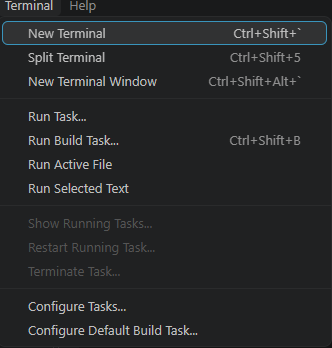
Type grok and press Enter
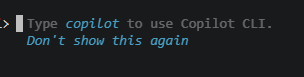
PS C:\my-app> grok
Grok Build’s prompt. In Billy’s session it looks like this:

What does that prompt mean?
It means Grok Build is running in this working directory. Files it writes land here. Commands it runs, run here. That is real access — which is why you approve deletes, deploys, and anything on the “never without approval” list in PROJECT.md.
grok is not recognized: installer did not land on your PATH. Close VS Code completely and reopen, or run the installer again. Sign-in prompt: use your xAI / SuperGrok account. Grok Build is a paid-agent surface — the free web chat is not the same thing. Confirm current access on x.ai/pricing.
Do not let it rip
Read PROJECT.md. Do not write code yet.
Write a numbered Phase 1 plan.
After each step include: what will be built, how I will test it, and any command.
Wait for my approval.
A numbered plan. You say yes to step 1 only. Then it implements step 1. Then you test.
What did I just do?
You pointed the instrument at the project brain and kept authority. Approval is a message from you, not a vibe.
Pasting an image — Windows Alt+V
In Billy’s Grok Build TUI on Windows, Ctrl+V pastes text. Alt+V pastes an image (a screenshot of an error, a mockup). That is not universal. It depends on OS, terminal, and app version. If Alt+V does nothing, say so in the lesson you give yourself: attach the image another way, or describe the error. Do not assume every agent, every OS, uses Alt+V.